
TF is a name still used for microSD cards. This guide covers TF cards; full-size SD cards need their own interface and configuration checks.
01
What can YOULEN supply for your embedded project?
You receive a proposed card configuration and a clear preparation scope. For system-image orders, we establish the image version, writing and verification work, and target-device acceptance at the sample stage.
The selected card’s performance, endurance and operating temperature are configuration-specific. A flash brand alone does not establish these properties.
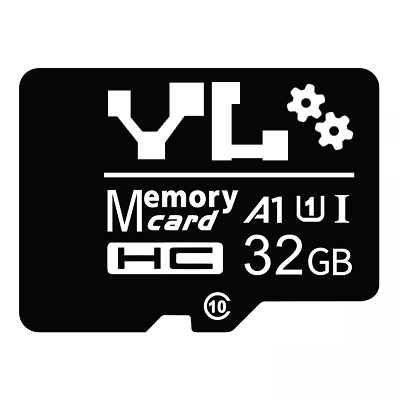
Shown: the 32GB A1/U1 design. Other capacities and speed classes follow the proposed configuration.
| Supply detail | Our supply and preparation |
|---|---|
| Capacity | Our current supply range is 2GB–256GB. We match the proposed capacity to the device and its storage needs. |
| Performance | We confirm whether a configuration is available for your required speed class, random-access or sustained-write target. We identify the reference read/write results available for that configuration. Performance in your device is evaluated with the sample. |
| Components | Our regular configurations mainly use Micron and SK hynix flash. We can disclose the proposed components. |
| Repeat supply | A disclosed bill of materials (BOM) and the configuration controls agreed for your order. |
| System-image preparation | An agreed source image, writing and verification method, partition-resizing arrangement and device-acceptance scope. |
| BOM changes | If component availability requires a change, we provide a new sample at least one month before the proposed change for your testing and confirmation. |
| Warranty | We supply cards with a one-year warranty. Failed cards are handled under the agreed warranty terms. |
02
What embedded-device work has YOULEN handled?
YOULEN recently received an order for 50,000 TF boot cards for an embedded-device project in the United States. We have also received more enquiries about embedded-device storage.
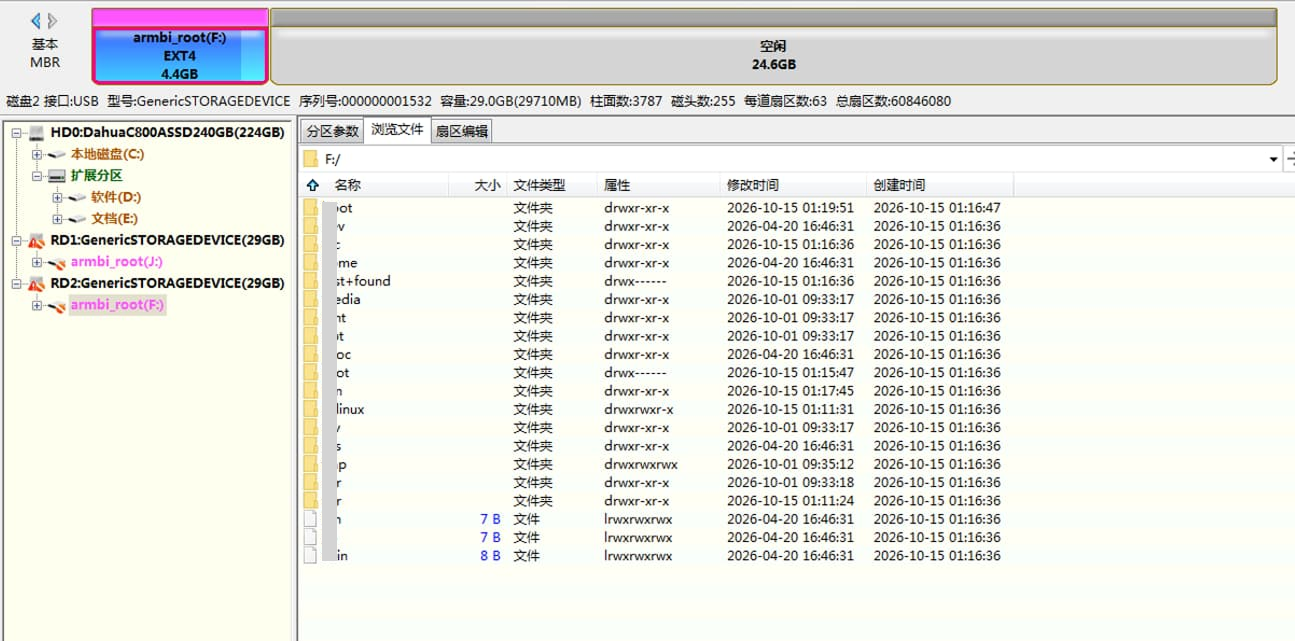
In separate Armbian preparation work, we reviewed a written image with a 4.4 GB EXT4 partition and 24.6 GB left unallocated. That record illustrates a delivery decision: retain the image layout, expand the system partition or provide a separate data partition.
The writing and partition records below are from that separate preparation work, not the US order. They show the preparation stages; they do not establish device boot performance or field reliability.
03
When is a TF card a good fit?
TF cards are a good candidate for supported development boards, mostly-read dedicated systems and replaceable installation media. Write-heavy systems need target-device evaluation; heavy swapping or storing only a few settings is not a good default use of a regular TF card.
These recommendations concern the storage approach. The final card choice follows the target device, workload and sample results.
| Application | Initial recommendation | Why and what to check |
|---|---|---|
| Development boards, prototypes and frequent image changes | Good candidate | Easy system preparation and replacement; confirm board support and image compatibility. |
| Dedicated systems that mostly read and write little | Good candidate | Match cost and performance to the workload; check background writes, temperature and power. |
| Data collectors, concentrators and gateways | Evaluate on the device | Capacity and replaceability may help; establish write volume, retention period and recovery behaviour. |
| Multiple applications, small files or frequent database access | Evaluate on the device | Random performance and response latency matter; sequential speed alone is insufficient. |
| Only a few settings or counters | Not the first choice | Small onboard storage may already meet the requirement. |
| Heavy use of swap space | Not the first choice | Reassess physical memory, write load and alternative storage. |
| Installation, upgrade or recovery media | Good candidate | Useful for distribution and field work; confirm the image and operating procedure. |
| Unattended devices with serious failure consequences | Evaluate on the device | Prioritise environment, power, redundancy and maintenance arrangements. |
04
Why choose a TF card instead of onboard storage?
The main advantages are preloading, replacement and flexible capacity. Compare the whole delivery and maintenance process before deciding which option costs less.
Preparing system cards in advance separates image writing from final assembly. Keeping an approved image version also makes delivered software easier to manage.
Where the card slot is accessible and the device supports card boot, a prepared replacement card can be part of the maintenance plan. Developers can also change cards to switch system versions.
Within the device’s supported range, the same hardware can use different card capacities for its system, content or data-retention needs.
Onboard storage has its own integration and production advantages. Compare the media, hardware design, programming, testing and repair process rather than assuming a TF card is always cheaper. A TF card normally provides persistent storage; it does not directly replace RAM.
05
Is the card for booting, running the system or storing data?
Boot media starts the device, system storage serves the operating system while it runs, and data storage holds application content. One TF card may do more than one job.
A device may boot from onboard storage and log to a TF card, or boot from a TF card and store large amounts of data elsewhere. ‘A Linux boot card’ alone is therefore not enough to choose a configuration: what happens after boot can change the recommendation.
| Role | How the device uses the card | Main priorities |
|---|---|---|
| Boot media | Reads startup code or system content at power-on. | Boot support, read behaviour and image layout. |
| System storage | Serves the operating system and applications during operation. | Random access, latency and background writes. |
| Data storage | Holds logs, recordings, audio or business records. | Capacity, write pattern, data protection and retention period. |
06
Do different embedded systems need different card preparation?
Yes. Startup software determines how the device boots. The operating system and its drivers determine file-system support; the application determines the read/write workload. The operating-system name alone does not specify a boot-card layout.
For example, Zephyr documents SD-card access and file-system integration. That supports a storage use case; it does not prove that every Zephyr board boots from the card. [1]
| Platform | What this means for the card | Project-specific detail |
|---|---|---|
| MCUs, bare-metal software and FreeRTOS | A real-time operating system (RTOS) does not itself provide a universal TF-card boot method. Card access for files is separate from boot support. | The exact microcontroller (MCU), bootloader and drivers determine whether the card holds startup code, an update package or application data. |
| Orange Pi, Armbian and embedded Linux | A whole-device system image carries its own layout. Writing it is different from copying files onto a formatted card. [3] | Use the image for the exact board. Establish the partition layout and whether the supplied image expands at first boot. |
| Raspberry Pi | Different models support different boot options. The preparation must match the model and selected boot path. [7] | The exact Raspberry Pi model, selected image and configured boot order. |
| Vendor-specific platforms, including Novatek, Ambarella and Realtek | The vendor’s board and software procedure defines the preparation. A recording card, firmware-update card and system card have different roles. | The exact chip, board, software version and card role, together with the vendor’s preparation instructions. |
| Android: external data storage | Adoptable storage is formatted and encrypted for one device. This is a data-storage mode, not a boot-image preparation method. [2] | Whether the device uses portable or adoptable storage. Any TF-card boot requirement needs the board’s separate startup procedure. |
07
Should an embedded TF card use FAT32 or EXT4?
There is no single format for every embedded TF card. For a whole-device image, the approved image supplies the layout. For a separate data card or partition, the device’s file-system support determines the format.
A file system organises files and directories. A card can have several partitions, each using a different file system.
| Preparation | How the file system is chosen |
|---|---|
| Ordinary files or data | Follow device support and file requirements. |
| A whole-device system image | Preserve the layout in the approved image. |
| A custom system | Follow the board, boot software and image requirements. |
| A separate data partition | Confirm support in the operating system and application. |
Some systems combine a FAT boot partition with an EXT4 system partition, but this is not a universal embedded Linux layout. [3][7]
08
Is copying an IMG file the same as writing a boot image?
No. Copying stores the image as a file; whole-device image writing prepares the media using the image’s layout.
A complete image may contain startup content, a partition table and file systems. If the device requires whole-device writing, dragging an .img file onto an existing partition usually does not prepare the required card.
Armbian’s official workflow includes selecting a board or local image, writing the target media and verifying the written data. [3]
This record from YOULEN’s Armbian preparation work shows an Orange Pi Zero3 image with writing complete.
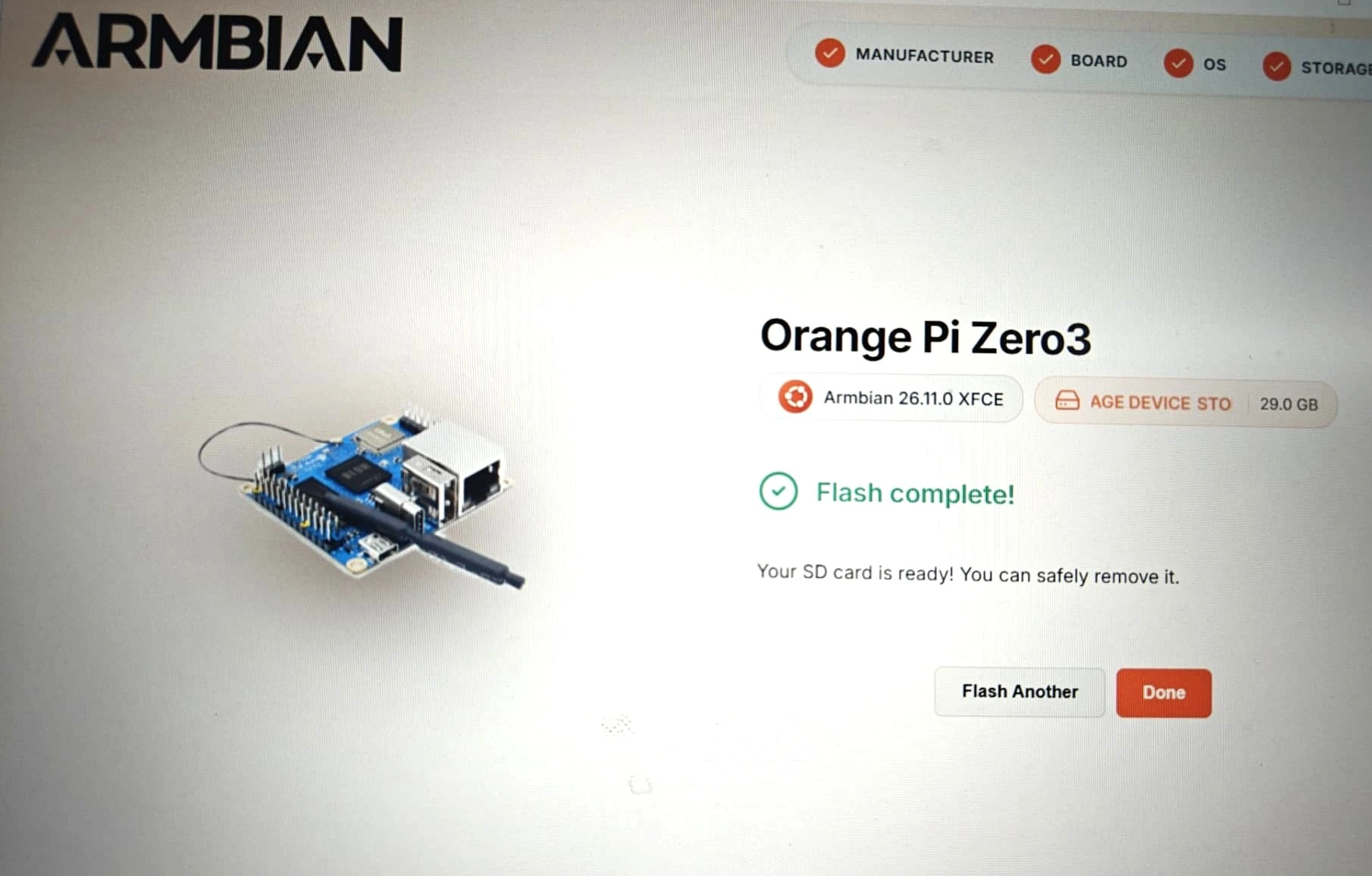
Before preparing a batch, identify whether the source is a whole-device image, a partition image, ordinary files or an upgrade package with its own procedure. The extension alone does not determine the method.
09
Why is some space unused after writing an image?
The image may use only part of the card, leaving the rest outside its partitions or file systems. That does not by itself indicate a capacity fault.
One recent YOULEN preparation record shows an EXT4 partition of about 4.4 GB and another 24.6 GB of unallocated space.
| Option | What must be agreed |
|---|---|
| Expand at first boot | The image includes this behaviour and it is confirmed on the target device. |
| Expand before delivery | The procedure, effect on booting and expected result are agreed. |
| Keep the original layout | The customer accepts the existing space arrangement. |
| Add a data partition | The system and application support it and the customer approves the layout. |
Extending a partition and extending its file system are related but separate operations. A custom image may not retain a distribution’s default first-boot behaviour.
The practical lesson is to confirm the card’s space arrangement at delivery—not simply stop when the writing tool says ‘complete’.
10
Will the same image fit every card with the same capacity label?
Not always. Two cards labelled 32GB are not enough to establish image fit: the image and its partition boundaries must fit within the target card’s addressable space.
Confirm image fit using the proposed supply configuration. If the image must work across configurations or batches, agree the target capacity requirement and image headroom at the sample stage.
Allow room for the system, applications, updates, logs and business data—not just the initial image.
11
Does an embedded Linux boot card need A2?
Not necessarily. A2 depends on workload requirements and host support. A mostly-read dedicated system and a system with frequent database access need different assessments.
A1 and A2 are SD Association application performance classes. IOPS means input/output operations per second; the random performance figures below use 4 KB operations.
| Class | Minimum average random read | Minimum average random write | Minimum sustained sequential performance |
|---|---|---|---|
| A1 | 1,500 IOPS | 500 IOPS | 10 MB/s |
| A2 | 4,000 IOPS | 2,000 IOPS | 10 MB/s |
These are class requirements under defined test conditions, not device boot times or card-lifetime figures. Host support also matters for A2 features. [4]
Large files and continuous recording emphasise sustained transfer. System files and databases also need random-access and latency assessment. C10, U3 or V30 alone does not establish A2 performance.
12
Does a low-write workload guarantee long service life?
Low writing reduces wear pressure, but it cannot be converted directly into a guaranteed number of years. Temperature, power, background writes, data retention and maintenance also matter.
A small business-data file does not mean the card receives few writes. The system may also write logs, databases, caches or file-system metadata.
For water and electricity metering, distinguish a terminal storing only a few settings from a collector or gateway recording data from many devices. Small onboard storage may be enough for the former; the latter may benefit more from TF capacity and replacement options.
Write endurance and data retention without power are different properties. [5]
13
What if the device loses power unexpectedly?
Assess the card, power supply, system writes and recovery process together. A speed class alone does not solve power-loss problems.
For a mostly-read dedicated device, consider a read-only root file system and a separate arrangement for data that must be written. Raspberry Pi’s resilience guidance discusses this approach; it does not make the entire card immune to power-loss damage. [6]
If a proposal includes ‘power-fail protection’, establish what it protects: data being written, stored data, internal card-management information or the state of the whole device after restarting.
14
Can a TF card replace RAM or ROM?
No. A TF card provides persistent storage. It does not replace physical working memory (RAM) or the chip’s internal read-only boot memory (ROM).
When a customer says ‘ROM capacity’, they may mean storage for the system, applications and files. Discuss the actual storage task.
Linux swap places some memory pages on storage; it does not add physical memory with equivalent performance. Occasional paging and sustained heavy swapping are different workloads. Heavy swapping calls for a fresh assessment of memory and storage.
15
What should be agreed before moving from samples to a batch?
Agree the card configuration and image preparation, complete the target-device acceptance, then confirm the batch-delivery arrangements.
Write verification, card testing and device acceptance answer different questions and should be agreed separately. Batch copying must also distinguish shared system content from device identities, keys or initialisation data that need individual generation.
| Stage | Agreed result |
|---|---|
| Project discussion | Device, card role, environment, capacity and quantity. |
| Configuration proposal | Applicable speed, flash, endurance and temperature requirements. |
| Image preparation | Approved version, checksum, writing method and resizing arrangements. |
| Writing and card checks | Check scope, method and records. |
| Device sample acceptance | Booting, operation, data handling and any required abnormal-recovery checks. |
| Batch confirmation | Configuration, image version, quantity, packaging, preparation schedule and warranty. |
| Later changes | How component or image changes are re-approved. |
Sources and scope
This guide combines public technical sources, recent YOULEN project requirements and image-preparation records. It is not a cross-platform test report. Platform requirements depend on the exact device and software version; card configurations and delivery arrangements follow the approved sample and order.
- Zephyr — SD-card access, drivers and file-system integration
- Android — adoptable storage, formatting and encryption
- Armbian — image writing and verification
- SD Association — A1 and A2 application performance
- Swissbit — endurance, retention and storage technology
- Raspberry Pi — making a more resilient file system
- Raspberry Pi — hardware and boot mechanisms