
What ESP32 products store on a TF card
Standard ESP32 and ESP32-S3 applications boot from onboard flash. A TF card can hold audio, models, interface resources or recorded data. Choose the card around how your product reads and updates those files.
A recent ESP32 storage request
We recently received ESP32 project inquiries, including one for storing model and audio files. The card would mainly be read during everyday use, with writes needed for content updates.
Audio, models and display resources
- Voice and audio products: Store prompts, lessons or music. Test continuous playback, track changes and seeking. Supported file formats depend on the device firmware.
- Products that load models: Store model files for loading or updating. Check that your chosen chip and software support the model. ESP-DL, Espressif's deep-learning library, supports loading
.espdlfiles from a card. Its documented process copies model data into the device's working memory, so a larger card does not increase the memory available to run the model. - Products with a display: Store images, fonts and interface resources. Test startup loading, common screens and resource changes.
If the product also records logs, photos or video, include those writes in the requirements. Reading a content library and continuously recording data place different demands on performance and write endurance.
For card selection across other embedded platforms, see our Embedded TF Card Guide.
Choose a TF card for your ESP32 product
Start with a capacity that holds the complete content package and planned updates, and that your device software supports. Then test candidate cards against the product's actual loading, playback and writing requirements.
ESP32 models: check the card connection
SDMMC is the chip's built-in memory-card host. SPI means Serial Peripheral Interface, another way to connect a card. Confirm which connection your actual board and firmware use.
| ESP32 model | What to confirm before buying cards |
|---|---|
| ESP32 | Native SDMMC with 1- or 4-bit card modes, or SPI. Confirm the board's chosen interface before comparing card speeds. |
| ESP32-C3 / ESP32-C5 / ESP32-C6 | SPI card access; these chips do not have an SDMMC host. If a display or other parts share SPI, test them together while the card is being used. |
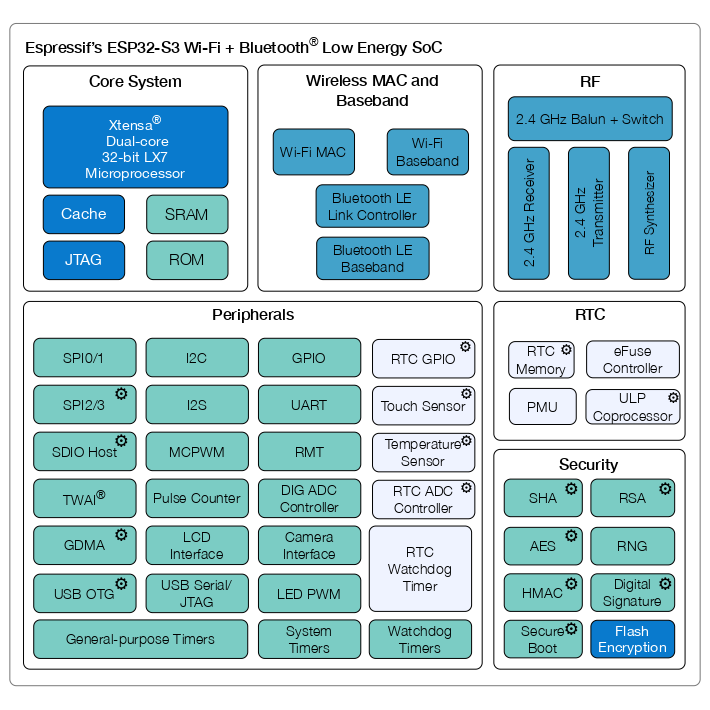
| ESP32-S3 | Native SDMMC with 1- or 4-bit card modes, or SPI. Check the actual board wiring: Espressif's S3-EYE board, for example, uses only 1-bit card mode. |
| ESP32-P4 | Native SDMMC. Faster card modes depend on the board's voltage supply and driver settings. Check the required read/write speed in the actual product. |
Use these interface details when discussing card options and samples with YOULEN. Card speed markings alone do not tell you how fast files will load in your board.
What to send YOULEN
To suggest available card configurations, we need the project details below. Mark anything still undecided as “to be confirmed.”
| What to share | Details to include |
|---|---|
| Device and software | Exact ESP32 variant, board model, firmware or development framework version |
| Files and capacity | Audio, models, images or other files; current total size and expected additions |
| Reads and writes | Continuous reading, frequent switching between files or startup loading; recording, logging and content updates |
| Format and environment | Required file system, card interface and temperature inside the device; your solution provider can help supply these details |
| Supply plan | Project stage, expected order quantities and reorders; blank cards or preloaded content |
Confirm the file system with your firmware team before preparing the cards. Support for FAT32 or exFAT depends on the software version and build configuration. For example, ESP-IDF, Espressif's development framework, does not enable exFAT by default. Verify the chosen setup in the target device. Espressif file-system documentation
If your product needs preloaded files
YOULEN can preload the files you approve. To prepare cards that match your product, confirm:
- The master files and version: Supply content you are authorized to use, with a clear version name.
- The directory and filenames: Provide the complete folder structure and file list.
- The card format and space: Confirm the file system, capacity and room needed for future updates.
- The file checks: Agree how to check file counts, sizes and checksums, which help identify changes to file contents.
- The matching firmware: Confirm how the device handles the card on first startup and during updates.
Check whether a mount failure can trigger automatic formatting. Mounting makes the card's file system accessible to the device. If the ESP-IDF setting format_if_mount_failed is enabled, a mount failure can trigger formatting and erase preloaded files. Ask your firmware team to check this behavior using a test card. Espressif formatting documentation
Your team or device solution provider defines the software behavior and product requirements. YOULEN supplies the cards and carries out the agreed preloading work. Confirm the file version, checks and sample results together before preparing the batch. See our memory card preloading service for more about content handover.
If model or audio files need protection, see our Memory Card Encryption guide to plan device software, card preparation and sample checks.
Test samples in the product you plan to ship
Being able to read files on a computer is only part of sample evaluation. Use the actual board, intended production firmware and real content package for the relevant tests below.
| Test | What to check and record |
|---|---|
| Power-on and restart | Check that the device recognizes the card and loads the correct content. Record failures and how often they occur. |
| File checks | Compare directories, file counts and agreed checksums with the approved content version. |
| Audio and interface use | Test continuous playback, switching, seeking and screen loading against the product's requirements. |
| Model loading | Check that the model loads and completes the intended task. Record loading time and working-memory use. |
| Writing and power-loss recovery | Where the device writes to the card, test recording and updates. Check the files and file system after an interrupted write and restart. |
| Content or firmware updates | Check that the device still recognizes the card and reads the correct version after an update. |
Set the acceptable loading times, test counts and failure criteria before testing. Record the sample identifier, board, firmware and content version so both teams can investigate issues and refer to the approved setup for later orders.
Carry the approved setup into bulk orders and reorders
Once samples pass your checks, record the approved card configuration, quantity and acceptance checks in the order. Add the content version, card-face artwork and packaging as needed. YOULEN can provide a bill of materials (BOM) and agree to lock it for an order.
If supply changes require a material change, we provide new samples at least one month before the proposed change for your testing and approval. When your firmware or content changes, repeat the affected checks rather than relying only on an earlier sample result.
Explore our memory card range for card options, or bulk supply and custom branding for card-face artwork, packaging and order arrangements.
Discuss your ESP32 project with YOULEN
Project evaluation samples
Up to two TF card samples are available free of charge for ESP32 product evaluation. Shipping costs are paid by the requester. Sample configuration and shipping arrangements are confirmed when we discuss your project.
Send your board model, target capacity and estimated quantity to discuss card options, samples and a quote. Include preloading needs if you have them. Files and directory details can follow by email.
Technical references from Espressif
- ESP32 startup guide and ESP32-S3 startup guide — application startup from onboard flash.
- Audio playback example — reading and playing files from a card.
- ESP-DL model loading guide — loading model files into working memory.
- File-system documentation — FAT32 and optional exFAT support.
- Formatting documentation — mount-failure and formatting settings.
- ESP32-S3 datasheet — source of the functional block diagram.
- ESP32, ESP32-S3 and ESP32-P4 — native card-host modes and board settings.
- ESP32-C3, ESP32-C5 and ESP32-C6 — SPI card access without an SDMMC host.
- ESP32-S3 board requirements — S3-EYE uses 1-bit card mode.
- Sharing SPI with other devices — board loading and initialization requirements.